Edit your client emails beside a live preview
Change the wording of every email Usual sends your clients, and see the real email beside it as you type, at desktop or phone width.
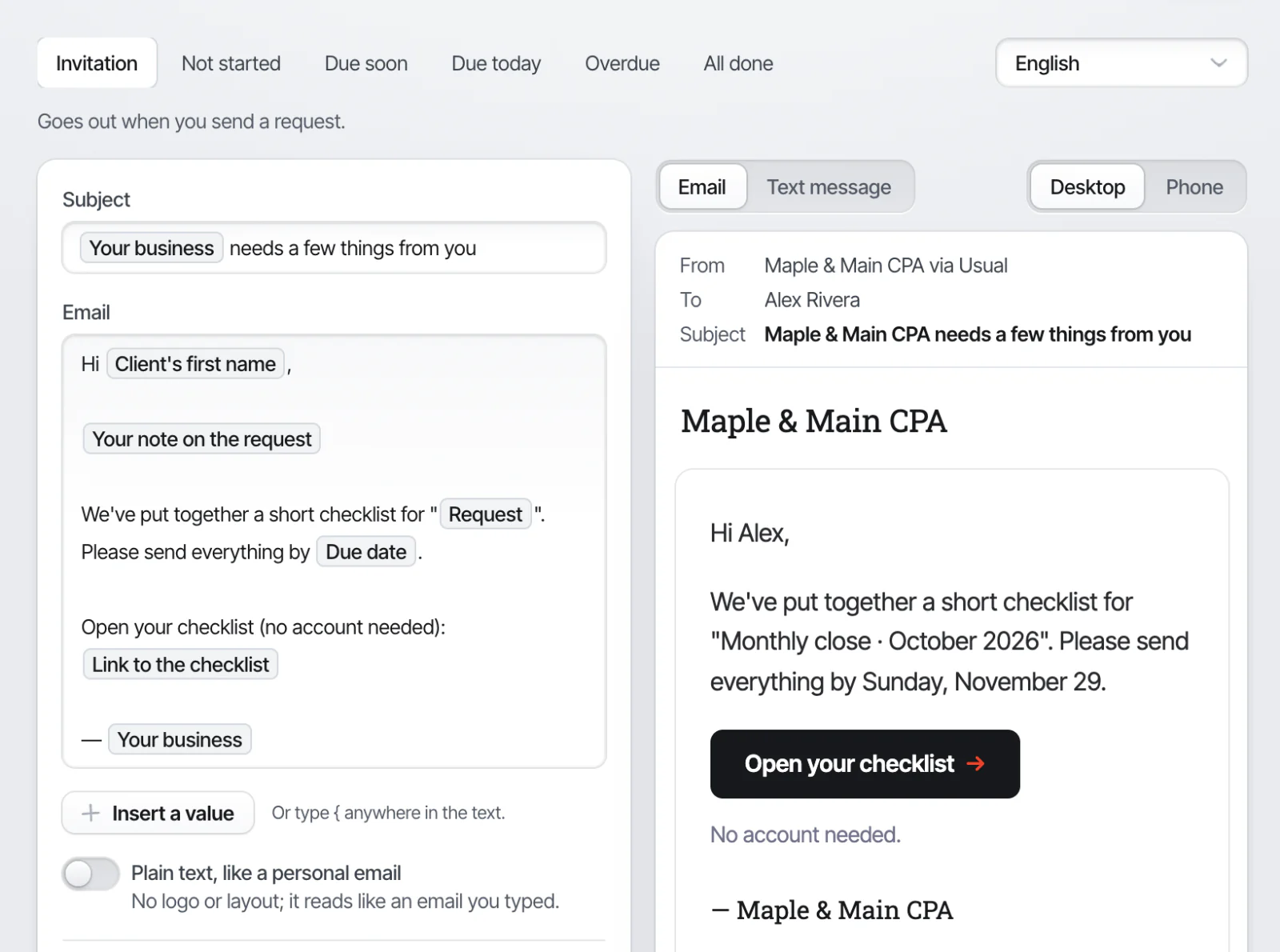
- 1Values like the client's name are chips
- 2Check it at phone width
Clients read your emails, not ours. Settings › Emails and texts now puts the wording on the left and the email exactly as the client gets it on the right: your firm's name and logo, your footer, the button to the checklist.
- Values such as the client's first name, the due date and the link sit in the text as labeled chips. Press Insert a value or type
{to pick one. - A value Usual doesn't know shows in red, so a typo never reaches a client.
- Switch the preview between desktop and phone width.
- Each message has its own tab: the invitation, the reminders before and after the due date, and the all-done note. Every language you send in can have its own wording.
- Plain text sends it like an email you typed, with no logo or layout.
The checklist library also opens on Start here: the checklists accounting firms send most. Every row has a Preview of the client's page before you pick it.