Usual + Zapier: document collection that tells the rest of your firm

When a client sends something, when everything is in, when your team finishes a request, Usual can tell the tools you already work in. And when a proposal is signed or a client is added elsewhere, Zapier can add the client to Usual and send the checklist for you.

Live today. Every trigger and action, one click from Settings › Developers in Usual.

In Usual · Everything Received

Willow Creek Vet Clinic

Monthly bookkeeping close · October 2026 · 4 of 4 required

Zapier · within seconds

Team chat

"Willow Creek's October is in. Ready to start."

Spreadsheet

New row in the close tracker, dated today

Task list

"Reconcile October" assigned to Ava, due Friday

Four moments Usual can tell Zapier about

Every request in Usual goes through the same four moments. Each one is an instant trigger in Zapier, so a Zap starts within seconds, not on the next poll.

  1. Request Sent

    A checklist goes out

    You send a request, or a recurring one goes out on its own (Team and Business).

    Good for: putting the due date on a calendar, logging it on the client's record.

  2. Client Sent Something

    The client sends a file or an answer

    Fires each time they send, with how much is in so far.

    Good for: a heads-up to whoever owns the client.

  3. Everything Received

    Every required item is in

    Usual stops the reminders by itself. This is the one most firms build on.

    Good for: starting the work: a task, a channel message, a row in the tracker.

  4. Request Completed

    Your team finishes the request

    Someone clicks Finish collection after reviewing what came in.

    Good for: closing the loop in your workflow tool or billing.

Two things Zapier can do in Usual

The other direction: let a signed proposal, a new row in a sheet or a form start the collection, without anyone opening Usual.

Action

Add Client

Adds a business or a person, with the contact who gets checklists and reminders. Usual numbers the client the way it numbers the ones you add yourself.

Kind *A business
Name *Proposal: Client name
Contact first name *Proposal: First name
Contact last nameProposal: Last name
Contact emailProposal: Email
Contact phoneOptional

Action

Send Checklist

Sends one of your checklists to a client, with Usual's reminders until it's in. Pick any checklist your firm has, built-in or your own.

Client *Add Client: ID
Checklist *New client onboarding
Due date *14 days from today
Email it now?Yes

Choose No for "Email it now?" to keep it as a draft you check in Usual before it goes.

Six Zaps firms set up first

Examples, not templates: swap in whichever chat, sheet, task or proposal tool your firm uses. Zapier connects to thousands of them.

WhenEverything Received

ThenPost in your team's channel (Slack, Microsoft Teams)

Know the moment a close can start

"Willow Creek's October is in" lands where your team already talks, with the client's name and due date. Nobody refreshes a list to find out.

WhenEverything Received

ThenCreate a task (Asana, ClickUp, Trello)

Turn "documents are in" into the next job

A "Reconcile October" task for the client's bookkeeper, due a few days out, created the minute the last statement arrives.

WhenA proposal is signed (Ignition, Anchor, PandaDoc)

ThenAdd Client

ThenSend Checklist: onboarding

Onboard a new client without touching it

The engagement is signed, the client exists in Usual, and the onboarding checklist is in their inbox with reminders running.

WhenRequest Completed

ThenAdd a row to a sheet (Google Sheets, Excel)

Keep a close log you can sort

Client, request, due date and the day it was finished, one row each. Easy to see who is always late and who is early.

WhenRequest Sent

ThenAdd an event on the due date (Google Calendar, Outlook)

Put every due date on the calendar

The team calendar shows which clients owe what each day, next to meetings and filing deadlines.

WhenA new row in your client list (Google Sheets, Airtable)

ThenAdd Client

Keep Usual in step with your master list

If your client list lives in a sheet or a CRM, new clients appear in Usual with the contact who should get requests.

What those moments look like in Usual

Nothing changes for your clients. They get the same branded link, on a phone or a laptop, and Usual does the reminding. Zapier only hears that something happened.

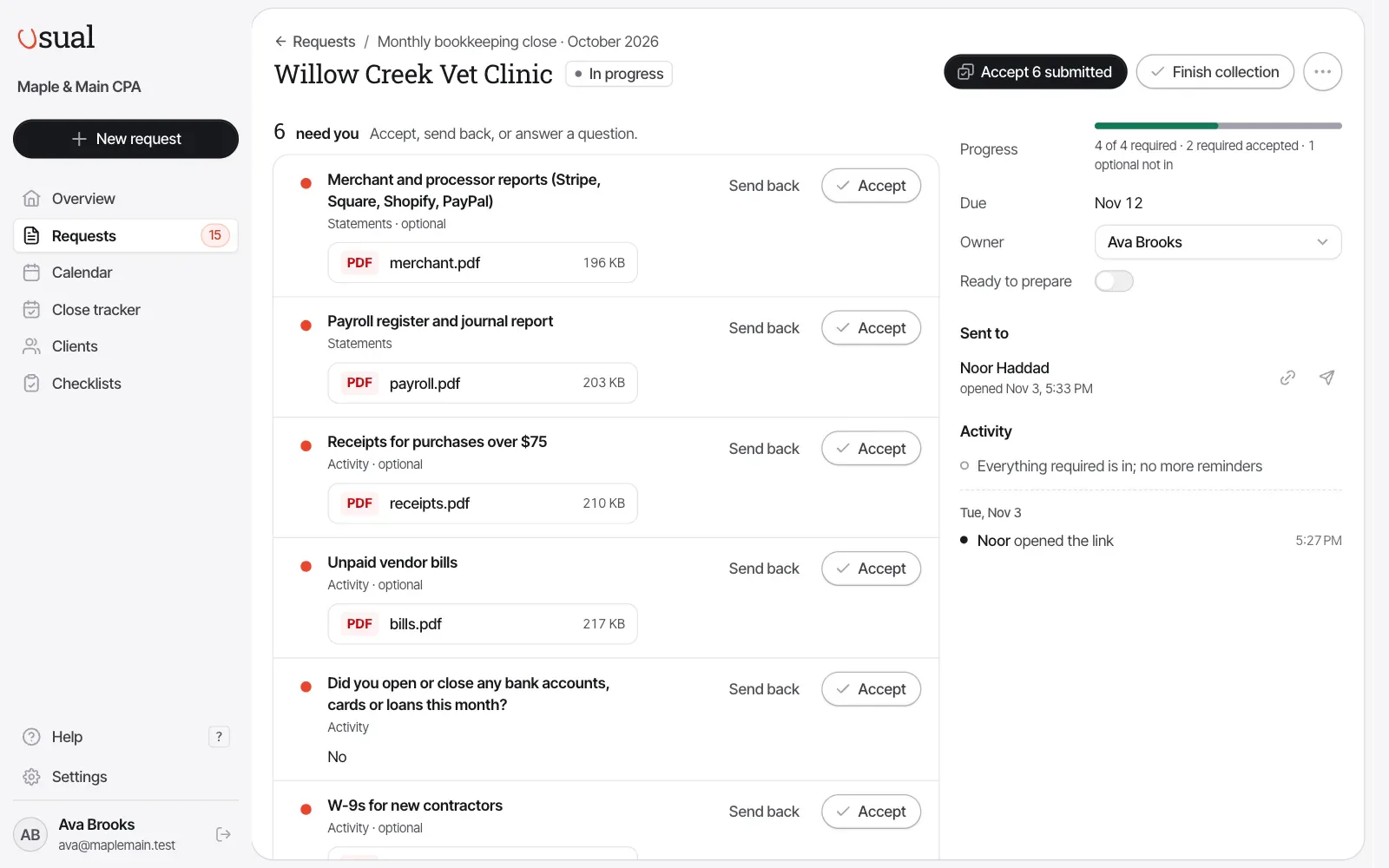
A request in Usual for Willow Creek Vet Clinic: six items to review with Accept and Send back buttons, a full progress bar and the note Everything required is in; no more reminders
Everything Received fires when the bar fills: every required item is in and the reminders stop. Your team still reviews and accepts here.
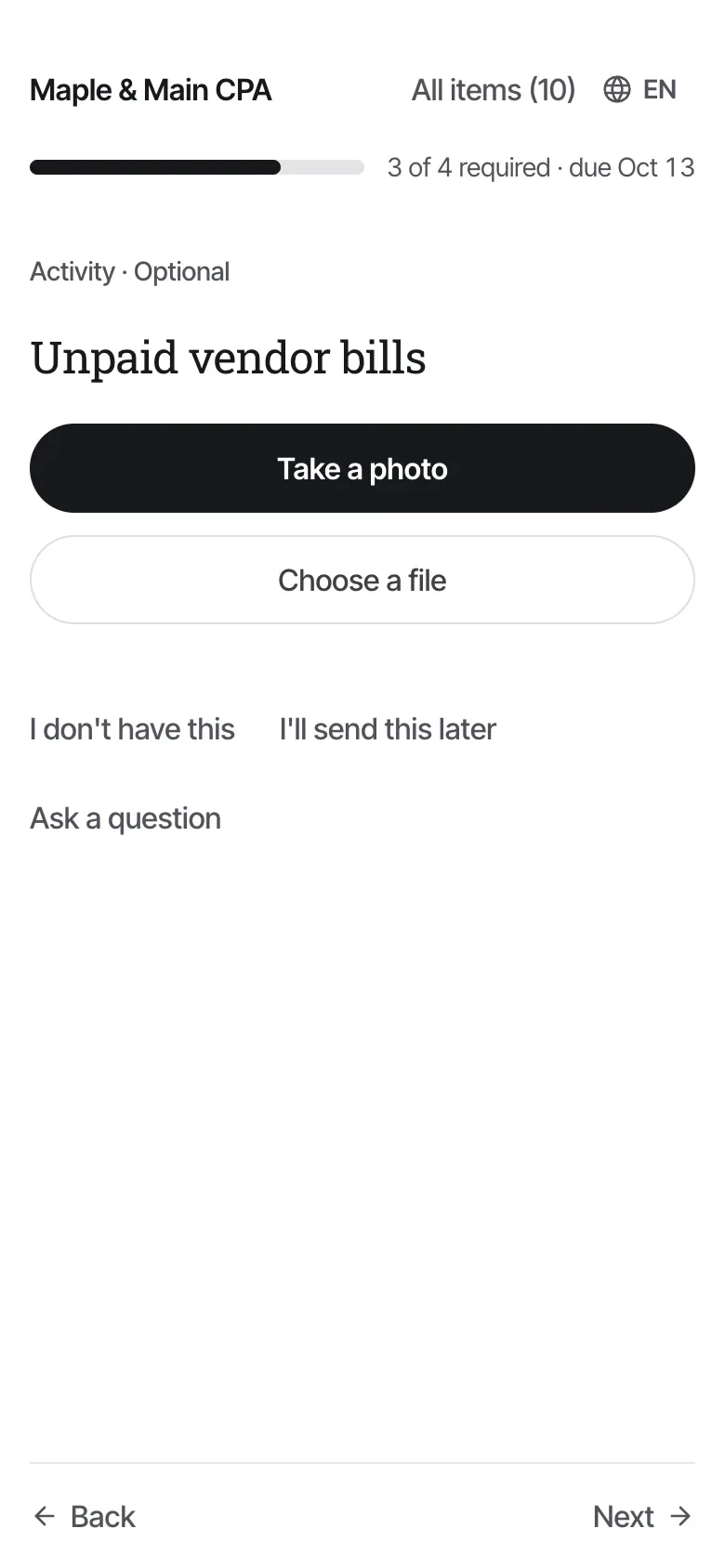
A client's phone showing one checklist item, Unpaid vendor bills, with Take a photo and Choose a file buttons and 3 of 4 required in
Client Sent Something fires each time the client sends a photo, a file or an answer.

Connect in three steps

About five minutes. You need to be an Owner or Admin in Usual, and a Zapier account.

  1. Open Usual on Zapier

    In Usual, go to Settings › Developers and click Open Usual on Zapier. Zapier asks you to accept the invitation once; after that Usual shows up in the Zap editor like any other app.

  2. Create a token and paste it in

    When Zapier asks to connect your Usual account, go back to Settings › Developers, name a token "Zapier" and click Create token. Copy it and paste it into Zapier. Usual shows a token once; you can revoke it any time, and the Zaps using it stop at once.

  3. Build the Zap and turn it on

    Pick a Usual trigger or action, test it against your real requests, and publish. Start with Everything Received: send yourself a test checklist in Usual, fill it in, and watch the Zap run.

What Zapier gets, and what it never does

A trigger carries the facts about a request, enough to name it in a message or a task. The documents stay in Usual, encrypted, where your team opens them. How Usual protects files.

FieldExample
ClientWillow Creek Vet Clinic
RequestMonthly bookkeeping close · October 2026
Statuswaiting, completed
Due2026-11-12
Items received / required4 of 4
Percent in100
Request ID, Client IDTo look the request up later or link back to it

Never sent to Zapier

  • Documents, photos and their file names
  • Your clients' answers to checklist questions
  • SSNs, EINs and bank account numbers
  • Notes between your team and the client

The token acts with the access of the person who created it. Revoke it in Settings › Developers and every Zap using it stops at once.

Questions

Does the Zapier integration cost extra?

No. It's included on every Usual plan, Free included. Zapier bills its own plans; multi-step Zaps run on a paid Zapier plan.

How do I open Usual's Zapier app?

In Usual, go to Settings › Developers and click Open Usual on Zapier. Accept the invitation once and Usual sits in the Zap editor like any other app, every trigger and action ready.

How quickly does a Zap run after something happens in Usual?

Within seconds. The triggers are instant: Usual tells Zapier the moment a request changes instead of waiting to be asked. If Zapier can't be reached, Usual keeps trying for 15 hours.

Who at my firm can connect Zapier?

Owners and Admins, because connecting needs an API token and only they can create one. A token acts with the access of the person who made it, so use an account that can see the clients your Zaps are about.

Can Zapier read my clients' documents?

No. Triggers carry the request's name, client, status, due date and how much is in. Files, answers and tax IDs never leave Usual through Zapier.

Can a Zap send a checklist without anyone checking it first?

Yes, if you set "Email it now?" to Yes. Set it to No and Usual keeps the request as a draft for someone to look over and send.

We use Make, n8n or our own scripts. Is there an API?

Yes. The same token works with Usual's public API, and Settings › Developers can send signed webhooks to any address for the same four moments. The API reference lists every endpoint.

Stop checking whether the documents are in

Usual asks your clients, reminds them until everything is in, and now tells the rest of your firm when it is. Usual is free, Zapier included.

Start free