Request documents from Outlook
Open a client's email in Outlook, see what they still owe, and send them a checklist without leaving the inbox.
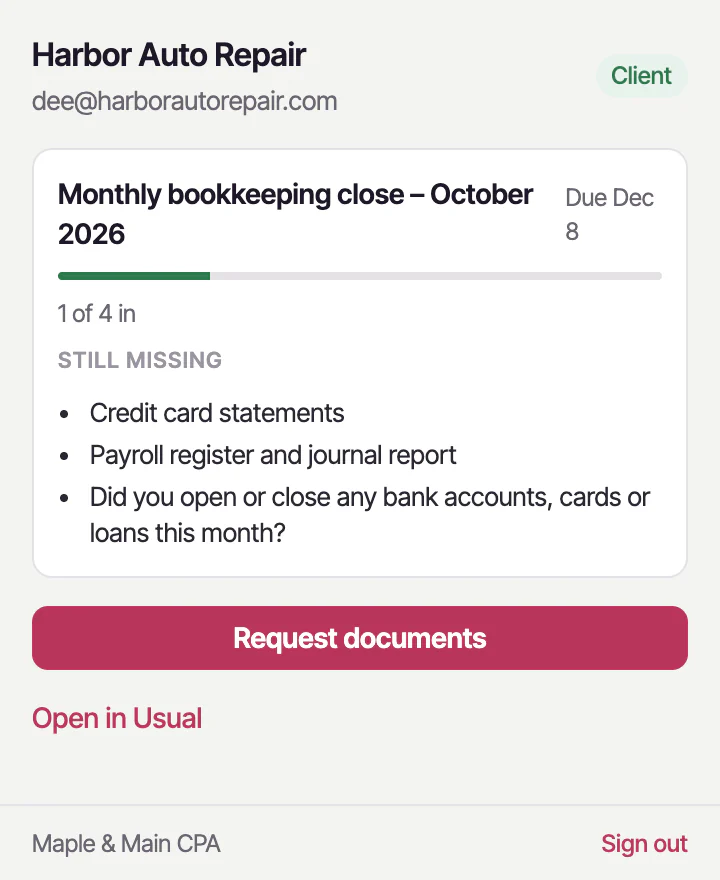
- 1Usual knows the sender
- 2What they still owe
- 3Send a checklist in one step
Most document requests start with an email: a client writes, and you need their W-2s, their 1099s, last year's return. Usual now sits in Outlook beside that email, so the request goes out before the email is closed.
- Open an email and choose Usual from the Apps button. The panel shows whether the sender is a client.
- For a client, it lists each open request, how much is in and what is still missing, the same as tracking requests in the app.
- Pick a checklist, such as the 1040 tax organizer or a monthly bookkeeping close, and a due date, then press Send. The client gets the link, and reminders start on your schedule.
- Someone who isn't a client yet is added as one in the same step.
- It reads only the sender's name and address, never the email or its attachments. More on how Usual protects client data.
- Works in Outlook on the web and new Outlook, on every plan, Free included.
To set it up, follow Request documents from Outlook. Microsoft explains custom add-ins in Use add-ins in Outlook. Building your own? The panel runs on the public API, and an AI assistant can do the same from Claude or ChatGPT.