Text message reminders
Clients who ignore email get their reminder by text. Each client agrees first, and Usual records when and how.
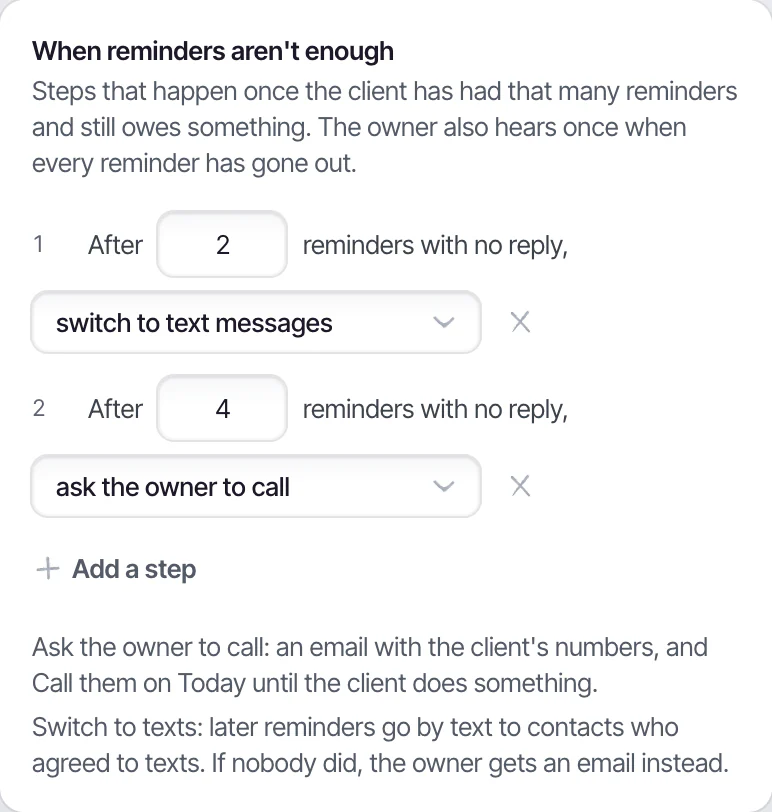
- 1Pick how many emails go first
- 2Then the reminders go by text
- 3Still nothing? The owner gets a call task
Some clients never open email but answer a text within the hour. Reminders can now switch to a text message after a set number of emails, so the client who always runs late hears from you where they actually look. It's the step most firms add when they reduce late client documents.
- In Settings › Reminders, add switch to text messages under When reminders aren't enough. From that reminder on, clients who agreed to texts get a text. Everyone else keeps getting email. How reminders work has every option.
- Clients turn texts on themselves on their request page, or you record that they asked in writing or in person. Usual keeps the date and how they agreed, so you have the record if anyone asks. The federal consent rules for texts are in 47 CFR 64.1200. Our guide to text message reminders for tax clients covers consent and wording.
- Texts follow your quiet hours and skip weekends and federal holidays, like email.
- A client who replies STOP is opted out at once, and a changed phone number turns texts off until the client agrees again. The full rules are in our SMS terms.
- 100 texts a month on Solo, 500 on Team and 1,500 on Business. See pricing.
Texts work best on a short list. Send the 1040 tax organizer by email, and let the text bring back the client who won't fill out the organizer.